Zang Auto – Project Overview
Purpose
Zang Auto is a Django-based automotive service invoice and workorder management system. It enables auto shops to manage customers, vehicles, labor and parts catalogs, create workorders with line items, and generate printable Master Service Invoices including inspection and anti-tampering documentation.
Tech Stack
| Layer | Technology |

|-------|------------|

| Framework | Django 5.2 |

| Database | SQLite (default) or PostgreSQL |

| Frontend | Tailwind CSS, DaisyUI, HTMX |

| Forms | django-crispy-forms, crispy-tailwind |

| Auth | Custom user model, django-otp (TOTP + email 2FA) |

| PDF | WeasyPrint |

| Config | django-environ, `.env` |
Project Structure
auto_service/

├── config/              # Django settings, URLs, WSGI

├── core/                # Shared utilities (email, impersonation, dashboard)

├── invoice/             # Main domain: customers, vehicles, workorders

├── users/               # Custom user model, auth, 2FA

├── reports/             # Report views (invoice PDF)

├── templates/           # Global & app templates

├── static/              # Static assets (if present)

└── manage.py
Main Features
Invoice App (/invoice/)
-
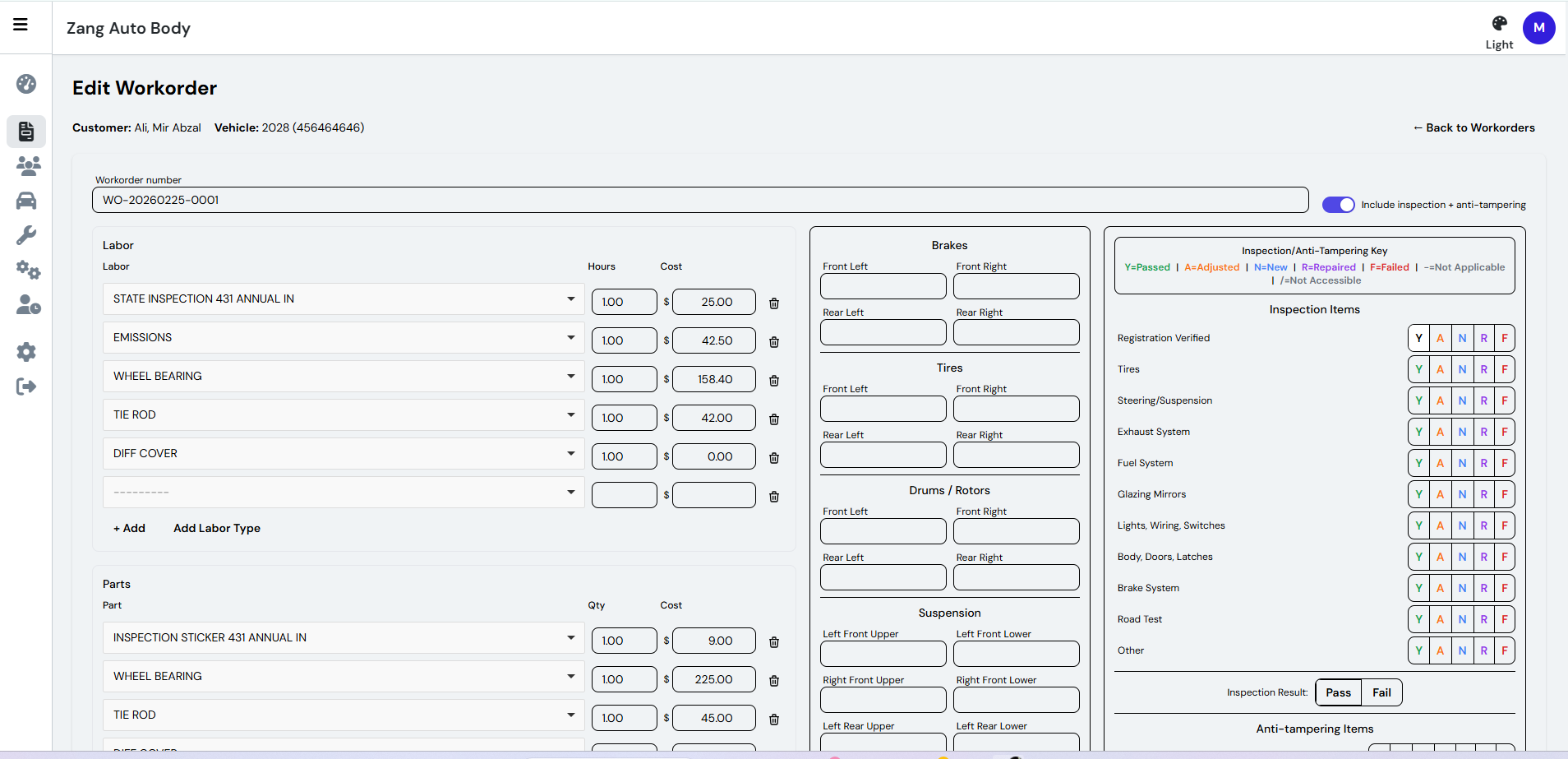
Workorders – Create and edit service workorders with a 3-step wizard (Customer → Vehicle → Workorder)
-
Labor & Parts – Line items from catalog lookups; labor uses hours × cost, parts use quantity × cost
-
Inspection & Anti-tampering – Template-based inspection items with choices (Y/A/N/R/F/-//), Pass/Fail result
-
Vehicle measurements – Brakes, tires, drums, suspension (FL/FR/RL/RR)
-
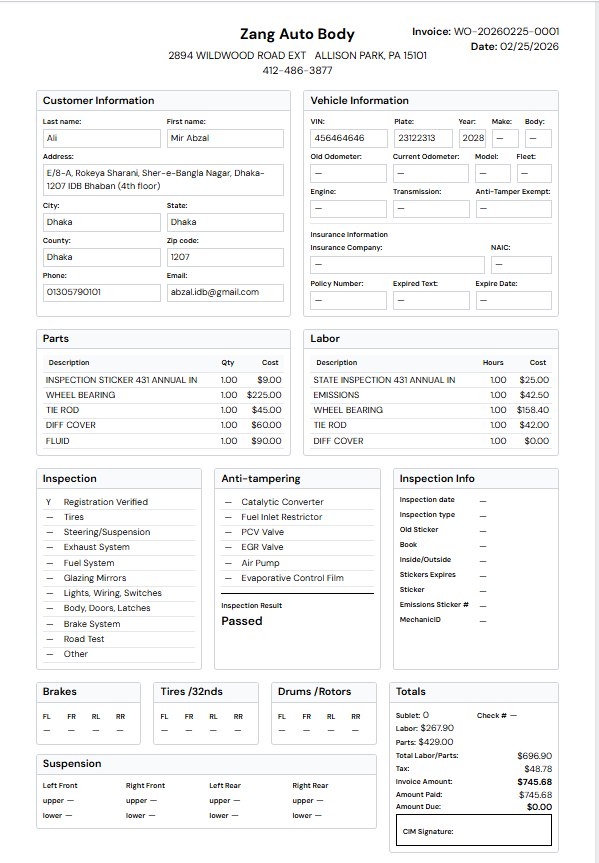
Master Service Invoice – A4 printable invoice with company info, customer, vehicle, labor/parts, inspection, totals
Catalog Management
-
Customers – List, create, edit; search by name/email; duplicate prevention (phone, email, name+address)
-
Vehicles – Per-customer; VIN, plate, year/make/model, odometer, insurance
-
Labor types – Description and default hourly rate
-
Parts – Description, part number, default cost
Users & Security
-
Custom user model with optional 2FA (TOTP or email code)
-
Impersonation for superusers
-
Login, password reset, two-factor setup/verify
Data Model (Simplified)
Customer (1) ──────< (N) Vehicle

    │                      │

    └──────────────────────┼────────────< Workorder

                           │                    │

                           │                    ├──< WorkorderLabor ──> Labor

                           │                    ├──< WorkorderPart ──> Part

                           │                    ├── InspectionInformation ──< InspectionItem

                           │                    └── AntiTamperingInformation ──< AntiTamperingItem
-
Customer – Name, address, phone, email (unique when set)
-
Vehicle – VIN (unique), plate, year/make/model, odometer, insurance
-
Workorder – Links customer + vehicle; labor/parts lines; brakes/tires/drums/suspension; inspection info
-
Labor / Part – Catalogs for workorder line items
-
InspectionItemTemplate – Labels for inspection/anti-tampering items
Key URLs
| Path | Description |

|------|-------------|

| `/` | Dashboard (login required) |

| `/login/` | Login |

| `/invoice/` | Workorder list |

| `/invoice/workorder/create/` | New workorder wizard |

| `/invoice/workorder/<id>/invoice/` | Printable Master Service Invoice |

| `/invoice/workorder/<id>/edit/` | Edit workorder |

| `/invoice/customer/` | Customer list |

| `/invoice/vehicle/` | Vehicle list |

| `/invoice/labor/` | Labor catalog |

| `/invoice/part/` | Parts catalog |

| `/two-factor/` | 2FA settings |
Configuration
Environment variables (.env):
-
SECRET_KEY,DEBUG,ALLOWED_HOSTS -
USE_SQLITE(defaultTrue) – SQLite vs PostgreSQL -
COMPANY_NAME,COMPANY_ADDRESS,COMPANY_CITY,COMPANY_STATE,COMPANY_ZIP_CODE,COMPANY_PHONE– Invoice header -
MAIL_*– SMTP for email (2FA codes, password reset) -
DEFAULT_INVOICE_EMAIL– Default recipient for “Send invoice by email”
Development
# Install

pip install -r requirements.txt

# Migrate

python manage.py migrate

# Run

python manage.py runserver
Admin: /admin/ (superuser only). Company name and branding are configurable via settings and context processors.